Preferences
controls the appearance of the current schematic — line widths, colours and fonts.
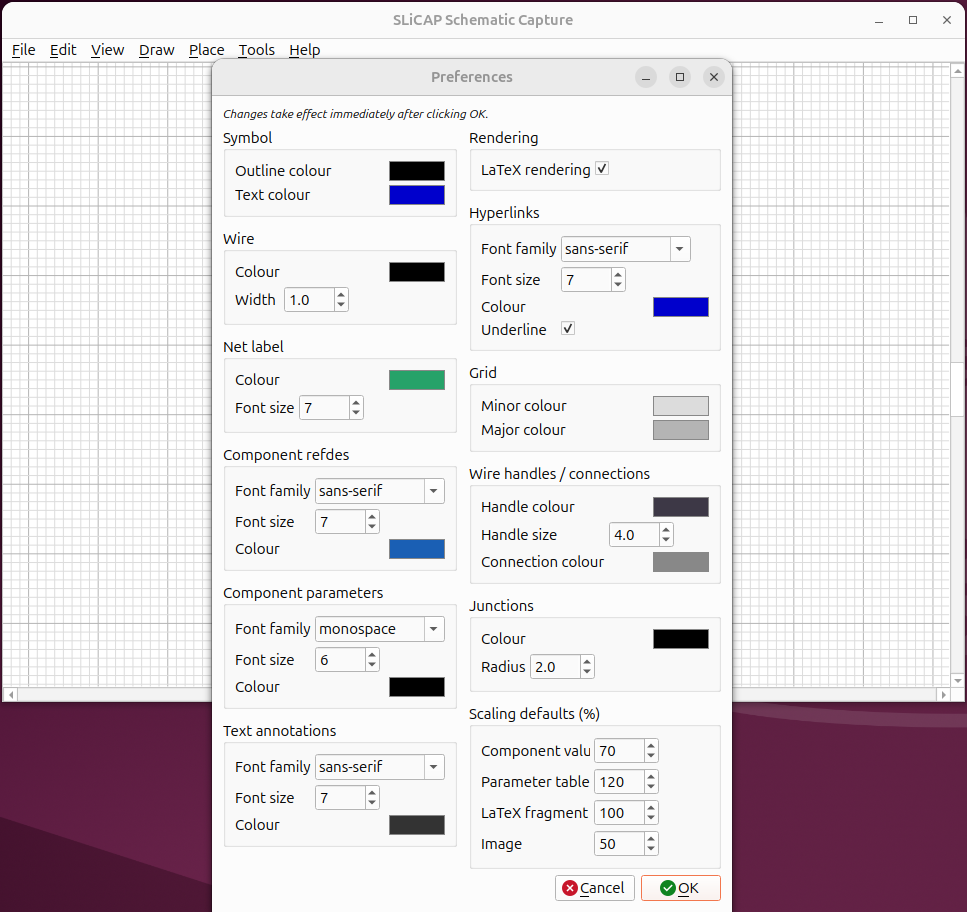
Fig. 38 The Preferences dialog, grouped by element type.
Per-schematic styling
Styling works on two levels:
The application’s global defaults are the template for every new schematic.
When you change a setting in Preferences, it applies to the current schematic and is saved into its
<name>.inisidecar file (see Project Files). Re-opening that schematic restores exactly the look it was saved with — independent of the machine’s global defaults.
This is what lets a book or report keep a consistent house style across all its figures.
What you can change
The dialog is grouped by element type, including:
Symbol — stroke and text colour.
Wire — colour and width.
Net label, Component refdes, Component parameters — colour, font and size.
Text annotations, Hyperlinks — fonts and colours.
Grid — minor and major line colours.
Wire handles / connections — the colour and size of wire selection handles, and the connection colour used for the unconnected-pin markers (see Wiring).
Junctions — colour and radius.
Rendering — turn LaTeX typesetting of labels on or off.
Scaling defaults — default sizes for parameter tables, LaTeX fragments and images.
Changes take effect immediately on the canvas.