Introduction
What this tool is
SLiCAP Schematic Capture is a desktop application for drawing electronic circuit diagrams. Unlike a pure drawing program, every symbol you place is a real circuit element: when you are done, the same diagram can be turned into
a SLiCAP / SPICE netlist for symbolic and numeric circuit analysis, and
a vector figure (SVG or PDF) for a report, paper or book.
The guiding idea is that documentation and design should integrate — the figure in your text and the circuit you analyse are one and the same object.
Key features
A grid-based canvas with snapping, zoom and pan.
A library of IEC-style symbols (resistors, capacitors, inductors, sources, controlled sources, the SLiCAP nullor, gyrator and transformer, ground and ports).
Self-describing symbols: every symbol carries its own SLiCAP metadata (prefix, nodes, model, parameters, description and a documentation link).
Smart wiring that keeps connections intact while you rearrange parts.
Visual markers on unconnected pins so you can see at a glance what still needs wiring.
Component properties with selectable, movable value/parameter labels typeset through LaTeX.
Rich annotations: free text, LaTeX fragments, images, hyperlinks, parameter tables and drawing primitives.
Self-contained projects: each schematic keeps its own style, symbol copies and render cache in sidecar files next to it (see Project Files).
Export to netlist, SVG and PDF — from the GUI or the command line.
How a schematic becomes analysis
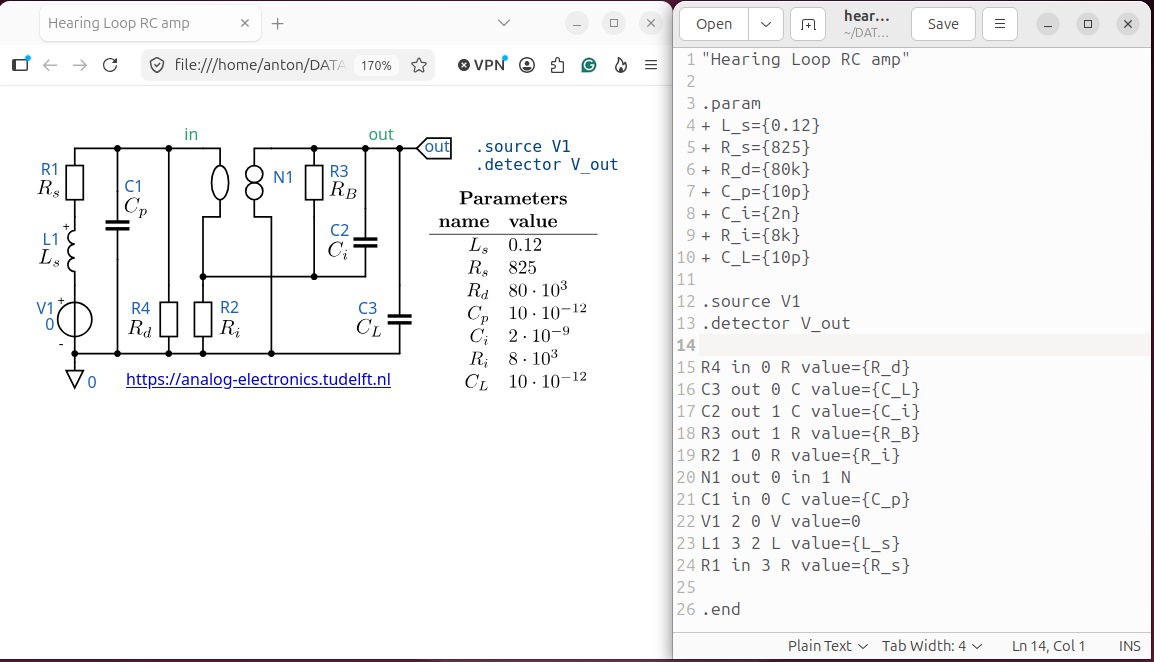
Fig. 28 One drawing, two products: a runnable netlist and a publication figure.
Draw the circuit on the canvas.
Designate the source, detector and (optionally) loop-gain reference.
Export the netlist and run it in SLiCAP, or export the SVG/PDF figure.
The remaining chapters walk through each of these steps.